CrystalSound
AI noise cancellation and meeting intelligence for cleaner calls
- Category
- Audio & Voice
- Pricing
- Offers a free/starter tier plus a paid Premium plan (billed monthly or yearly per user, exact price not published in page content, with a 7-day free trial and a 30-day money-back guarantee), a custom-quote Enterprise tier, and an upcoming Elite tier listed at $228/user/year (pre-signup discount advertised).
- Best for
- CrystalSound suits remote employees, distributed teams, podcasters, and customer-facing professionals (sales, support, recruiting) who regularly join calls from noisy or unpredictable environments and want consistent audio quality regardless of which conferencing app a call happens to use.
- Official site
- crystalsound.ai
- Last updated
- August 2026
CrystalSound tackles a specific and common pain point in remote work: unpredictable background noise during calls, from barking dogs to keyboard clatter to other people talking nearby. Rather than building a competing video-conferencing app, it positions itself as a layer that sits underneath whatever conferencing tool a team already uses, appearing to that app as just another microphone. That approach is what lets it claim broad compatibility across Zoom, Google Meet, Microsoft Teams, Discord, Slack, Skype, Loom, and OBS without needing separate integrations for each.
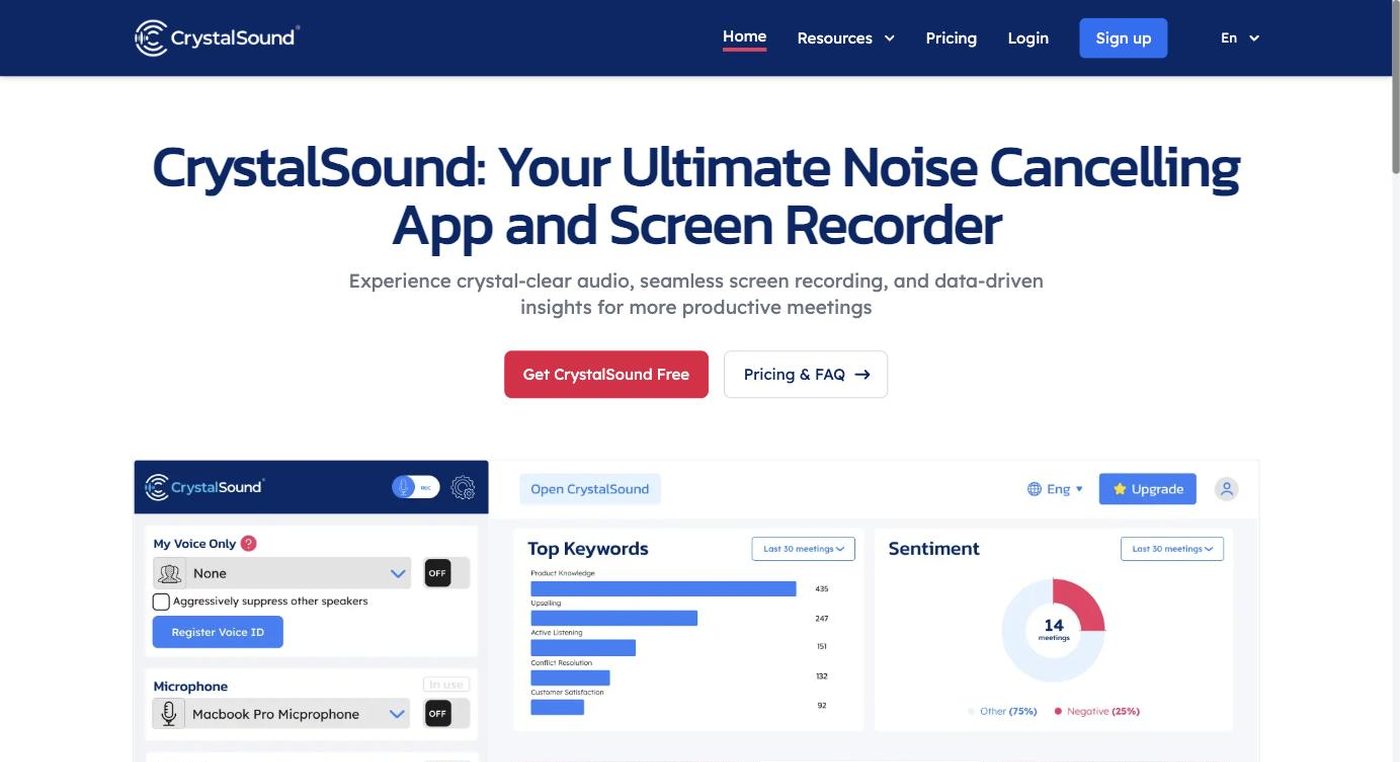
Beyond noise suppression, CrystalSound layers on adjacent meeting-productivity features: screen and audio recording captured from both sides of a conversation, and — on higher tiers — automatically generated meeting summaries and analytics. A "My Voice Only" mode narrows further, isolating a single speaker's voice and suppressing everything else the microphone picks up, which is useful in noisy shared spaces or open offices. The company emphasizes that its noise processing happens on-device rather than by streaming raw audio to a remote server, a detail likely aimed at security- and privacy-sensitive buyers such as regulated industries or enterprise IT teams.
Commercially, CrystalSound follows a freemium model: a free/starter tier for basic use, a Premium subscription (with a 7-day free trial and a 30-day refund window) that unlocks cloud recording, file-based audio enhancement, and voice effects, and an Enterprise tier aimed at organizations that need bulk licensing or virtual desktop infrastructure (VDI) support. A forthcoming Elite tier is positioned to add meeting transcription and performance/risk analysis on top of Premium, though it was still listed as "coming soon" with pre-signup pricing at the time of this review.
CrystalSound suits remote employees, distributed teams, podcasters, and customer-facing professionals (sales, support, recruiting) who regularly join calls from noisy or unpredictable environments and want consistent audio quality regardless of which conferencing app a call happens to use. It's also a fit for organizations that value on-device audio processing for privacy or compliance reasons and want meeting recording and summarization bundled with the noise-cancellation tool rather than sourced separately.
Key features
Deep-learning noise cancellation
Filters background noise and unwanted background voices from both the user's and other participants' audio using a neural-network model, rather than simple filtering.
My Voice Only isolation
A mode that focuses specifically on the primary user's voice, suppressing other people and ambient sound picked up by the same microphone.
Universal virtual-microphone integration
Installs as a selectable microphone device so it works with essentially any conferencing or streaming app without a dedicated plugin per platform.
Screen and call recording
Captures bidirectional audio alongside screen content during meetings, with cloud recording available on paid plans.
Meeting summaries and analytics
Generates automatic meeting minutes, keyword extraction, and performance analytics, expanding on higher tiers to transcription and risk/performance analysis.
On-device processing
Runs noise cancellation locally rather than routing raw call audio through external servers, a design choice aimed at privacy-conscious users.
Pricing breakdown
Free / Starter
- Basic noise cancellation access
- Fallback tier after any Premium trial ends
- Entry point before upgrading
Premium
- All Starter features
- Cloud call recording
- File enhancement for existing audio recordings
- Voice effects (pitch shift, reverb, robotic voice)
- Team license management
Elite (Coming Soon)
- All Premium features
- Meeting transcription
- Performance analysis
- Risk analysis and improvement suggestions
Enterprise
- Unlimited noise cancellation
- Bi-directional noise cancellation at scale
- Secure offline screen recording
- Bulk order discounts and VDI support
Pros and cons
Pros
- Because it runs as a virtual microphone rather than a plugin, it doesn't lock a team into one video-conferencing vendor — the same install works across Zoom, Meet, Teams, and more.
- On-device audio processing is a meaningful differentiator for organizations with strict data-handling policies that are wary of cloud-processed call audio.
- Combining noise cancellation with recording and meeting-insight tooling reduces the number of separate point solutions a team needs to license.
- The tiered structure (free entry point, trial-backed Premium, refund guarantee) lowers the risk of committing before verifying the noise cancellation actually works in a given environment.
Cons
- The lack of a clearly displayed Premium price on the pricing page is a friction point for buyers trying to budget before starting a trial or talking to sales.
- The most differentiated meeting-intelligence features — transcription, performance and risk analysis — sit behind the Elite tier, which was not yet generally available at review time.
- As a persistent local application acting as a system microphone, it carries more setup and OS-permission overhead than a purely cloud/browser-based competitor.
- Voice effects and cloud recording are paywalled, so the free tier mainly serves as a noise-cancellation trial rather than a full-featured option.
Alternatives to CrystalSound
Frequently asked questions
What does CrystalSound actually do?
It's an AI-powered virtual microphone that removes background noise and unwanted voices from calls in real time, and also offers screen/audio recording plus automatically generated meeting summaries.
Which apps does CrystalSound work with?
It works with essentially any app that accepts a microphone input, including Zoom, Google Meet, Microsoft Teams, Discord, Slack, Skype, Loom, and OBS, because it installs as a selectable virtual microphone rather than a per-app plugin.
Is CrystalSound free?
There is a free/starter tier with basic functionality, plus a paid Premium tier that includes a 7-day free trial and a 30-day money-back guarantee.
How much does CrystalSound Premium cost?
The exact price was not displayed in the site's published pricing content at the time of research; pricing is per user, billed monthly or yearly, and interested buyers should check the live pricing page or start the free trial for current rates.
Does CrystalSound process audio on external servers?
CrystalSound states that its noise cancellation runs on-device, meaning raw call audio is processed locally rather than transmitted to external servers for that function.
Does CrystalSound offer meeting transcription?
Meeting transcription along with performance and risk analysis is planned for an upcoming Elite tier, which was listed as "coming soon" with pre-signup pricing rather than fully available.
Ready to try CrystalSound?
Head to the official site to explore pricing and start a free trial where available.
Visit CrystalSound →